App workflow & pages
This page walks through the app page by page, in the order a typical user would follow it: look at the full PAM list, mark your own products, and then watch their support status.
1. Overview (Main) — the full PAM product table
Route: "" (hash root) · Controller: Main.controller.ts · View: Main.view.xml
The landing page shows every entry of the loaded PAM data in a sortable, filterable table.
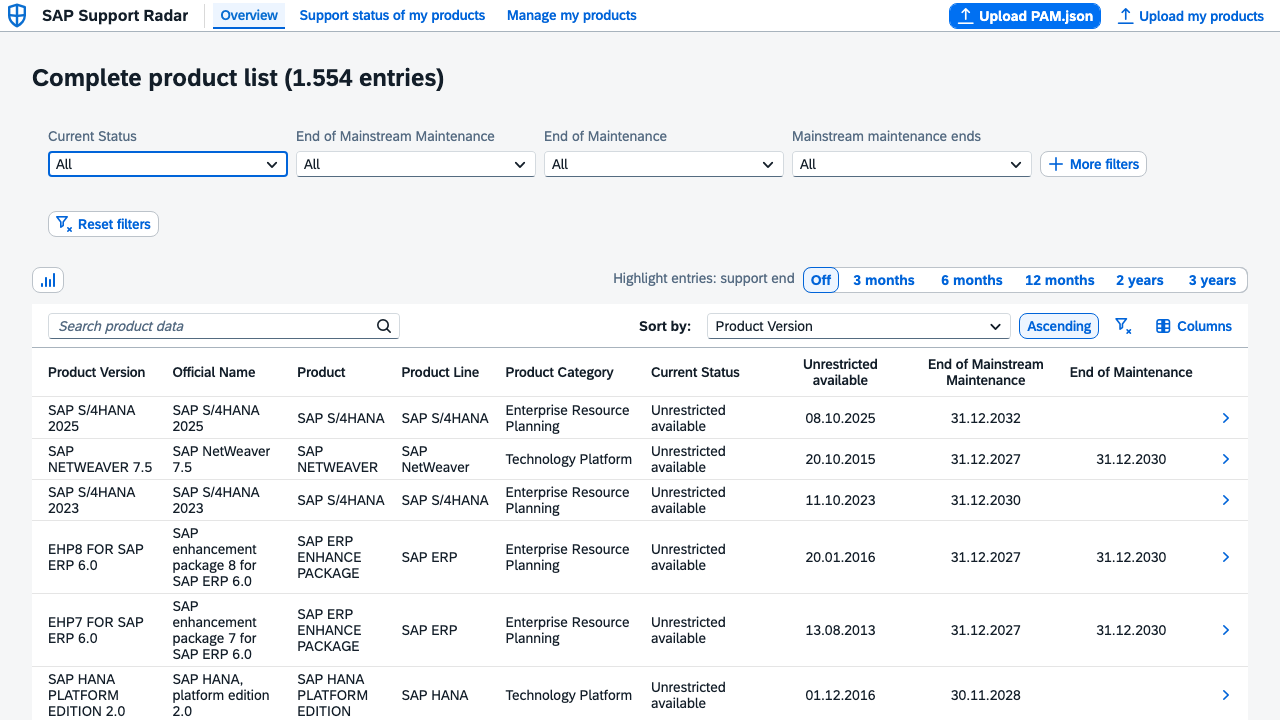
Key interactions:
- Global search (
globalSearch) does aContainsfull-text match acrossversion,name,product,line,category(seeSEARCH_FIELDSinwebapp/model/pamFilters.ts). - Quick filters (Current Status, End of Mainstream Maintenance, End of Maintenance, Mainstream maintenance ends) plus a "More filters" popover with additional free-text filters (Product Version, Product, Product Line).
- "Highlight entries: support end" segmented button colors rows red/yellow if their mainstream maintenance end date falls within the chosen horizon (3 months … 3 years) — implemented by
BaseController#onSupportEndHighlightChange/#supportEndHighlight, using the centralized thresholds inwebapp/model/supportEndThresholds.ts(red within 6 months, yellow within 12 months by default). - Sort by any column, ascending/descending, with chronological (not alphabetical) sorting for date fields (
compareDatesinwebapp/model/germanDate.ts). - Columns popover toggles optional columns on/off (Add-On Version, restricted-availability dates, SAP HANA readiness, EOP1/EOSK, Support Portal URL).
- Chart icon opens a status-distribution bar chart dialog for the currently filtered rows:
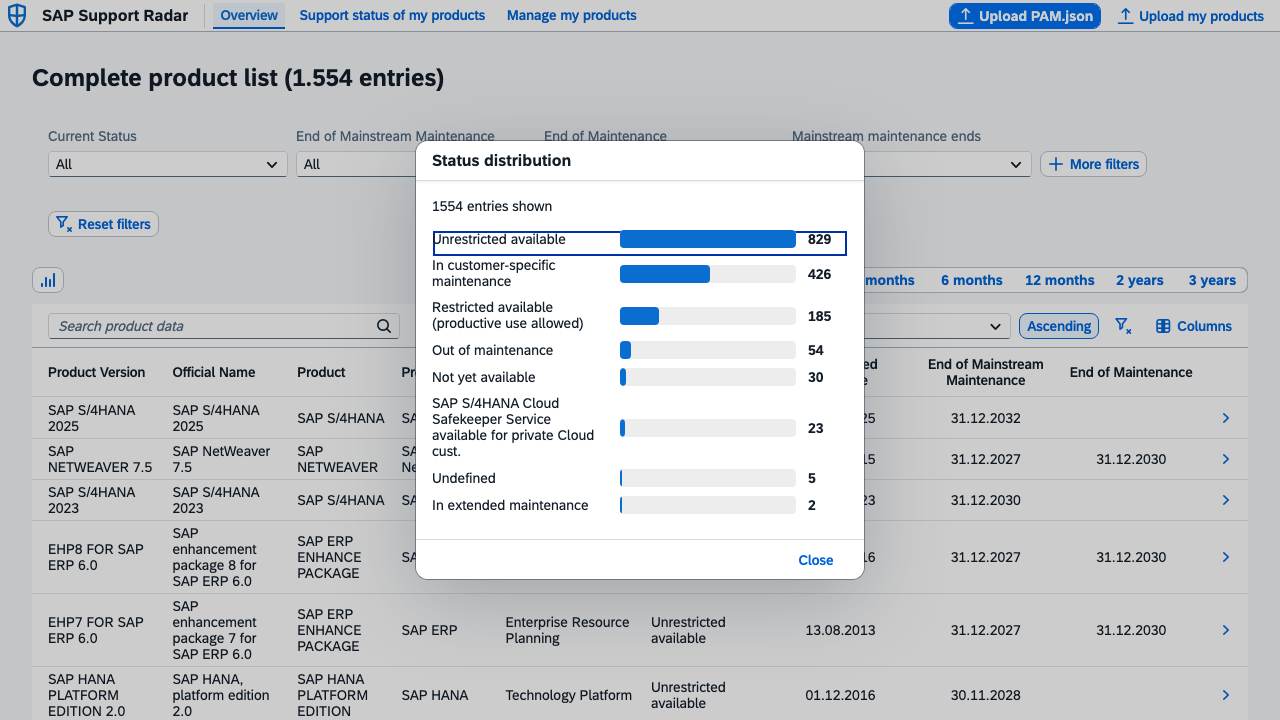
- Tapping a row navigates to that entry's Product detail page.
2. Manage my products (MyProducts) — build your own landscape
Route: myproducts · Controller: MyProducts.controller.ts · View: MyProducts.view.xml
Lets you pick, from the full PAM list, which product versions are actually part of your own landscape.
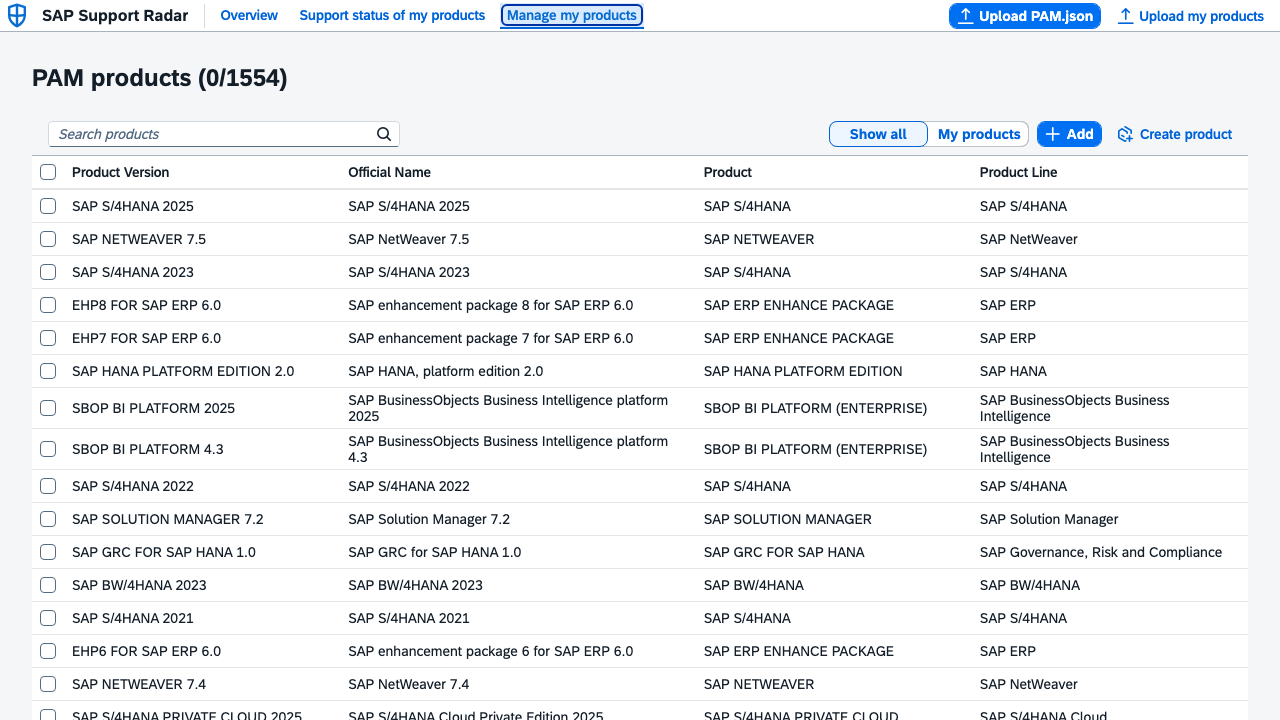
- Checkbox selection (
mode="MultiSelect") is tracked independently of filtering/scope inselectedProductKeys(aSet<string>of product identity keys), so switching the search or scope filter never loses your in-progress selection. - Show all / My products scope toggle filters the table to only already-saved own products.
- Add (
onAddProducts) persists the current checkbox selection into theownProductsmodel. Products created via the "Create product" form (see below) that have no matching PAM row are preserved rather than silently dropped by this "declarative replace". - Create product navigates to the MyProductsAdd sub-page, for products not present in the PAM export at all.
- Download exports the current
ownProductsselection asOwnProducts.json, which can be re-uploaded later (or shared with a colleague) via the toolbar's "Upload my products" button. - Unsaved checkbox changes are discarded when the page is left and revisited — the
ownProductsmodel is always the single source of truth.
3. Create product (MyProductsAdd)
Route: myproducts/add · Controller: MyProductsAdd.controller.ts · View: MyProductsAdd.view.xml
A plain form for manually adding a product that doesn't exist in the loaded PAM data (e.g. a custom or very new product version).
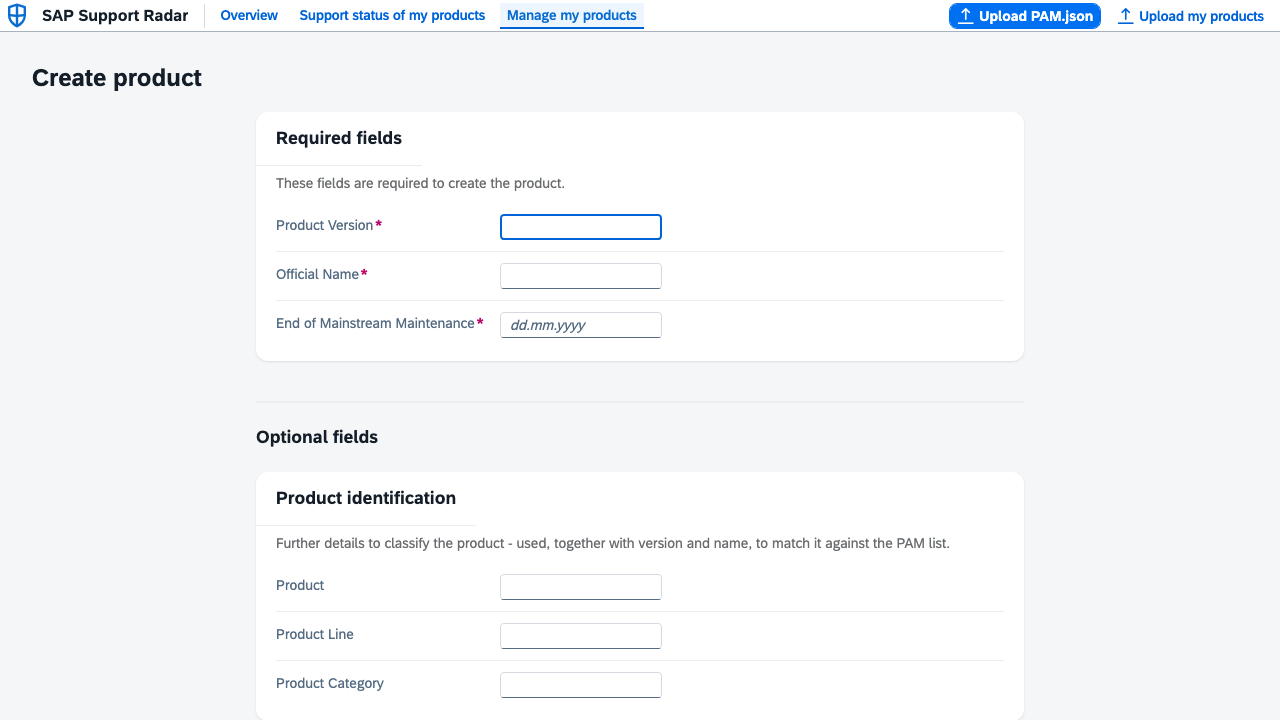
- Only Product Version, Official Name and End of Mainstream Maintenance are required (
REQUIRED_FIELD_IDS); all other PAM fields are optional. - On Save, the new entry is appended to both the
pammodel (so it has a row to render/navigate to) and theownProductsmodel — appended, never inserted, so it never shifts the index-basedproductdetail/{index}route of any existing entry. - Cancel discards the form and returns to MyProducts.
4. Support status of my products (SupportStatus)
Route: supportstatus · Controller: SupportStatus.controller.ts · View: SupportStatus.view.xml
The same search/filter/sort/highlight UI as the Overview page, but the table is additionally filtered down to only the entries matching the user's own product selection (an OR-of-ANDs filter over the product identity tuple, built by createOwnProductsFilter).
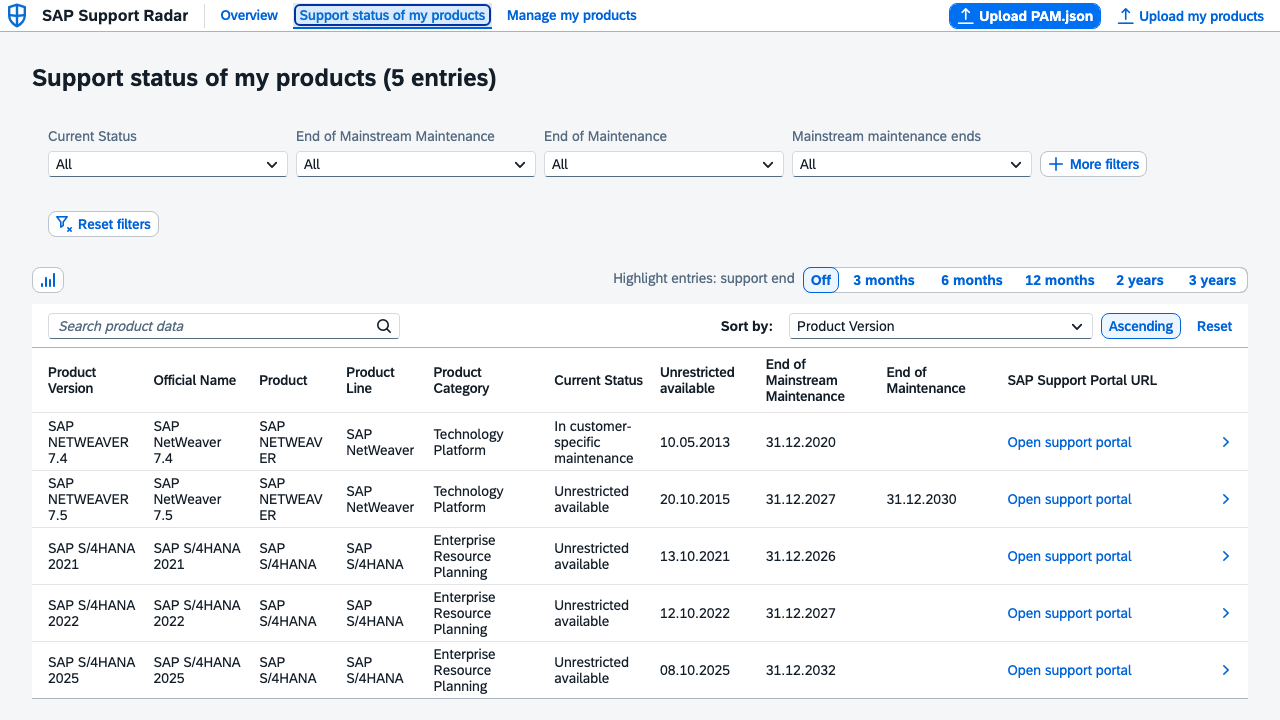
If no own products have been selected yet, the table is empty and a message banner explains that own products need to be maintained first (see the hasOwnProducts/noOwnProducts flags on the supportStatus view model).
5. Product detail
Route: productdetail/{index} · Controller: ProductDetail.controller.ts · View: ProductDetail.view.xml
Reached by tapping a row in the Overview or Support status table (BaseController#onProductRowPress, shared by both — MyProducts' table intentionally does not get this, since its rows already use tap-to-toggle checkbox selection). The {index} route parameter is the entry's position in the pam model's underlying array, which stays stable across sorting/filtering since Filter/Sorter only reorder the table's ListBinding view, never the underlying data array.
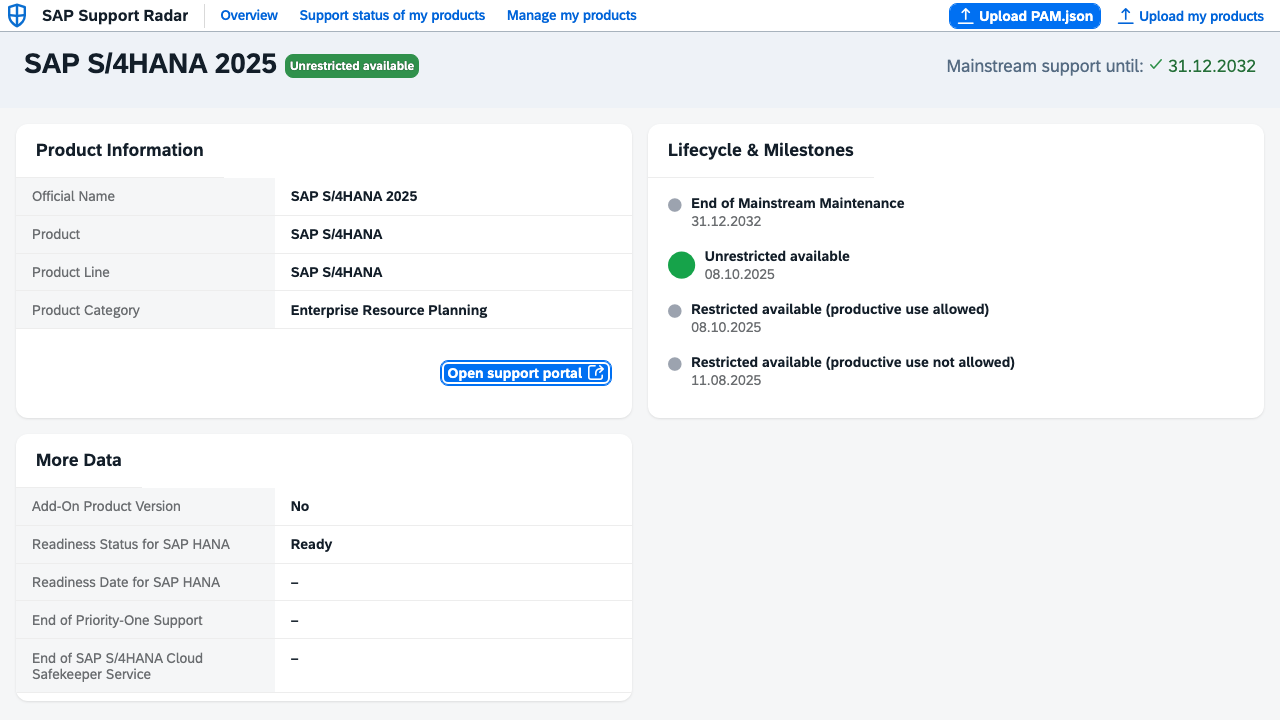
- Product Information card: official name, product, product line, category, plus an "Open support portal" link (opens the entry's
urlfield in a new tab) if the PAM data provides one. - Lifecycle & Milestones timeline: a chronological list of the entry's availability/support-end dates (
ra_puna→ra_pua→ua→eomm→eom), with the currently active milestone highlighted larger — green for an ongoing availability phase, red if the active milestone is already an end-of-maintenance date. Future milestones are colored by the same red/yellow/gray thresholds used for table-row highlighting. - More Data card: the remaining PAM fields (Add-On Version, SAP HANA readiness, EOP1, EOSK).
- UI5 Details card (only for
product === "SAP UI5"entries): LTS flag, end-of-cloud-provisioning date, SAPUI5 distribution/ABAP compatibility, Fiori front-end server compatibility. - The title bar's add/remove own product button toggles this entry's membership in the
ownProductsselection directly from the detail page (onToggleOwnProduct), without having to go back to MyProducts.
Responsive layout
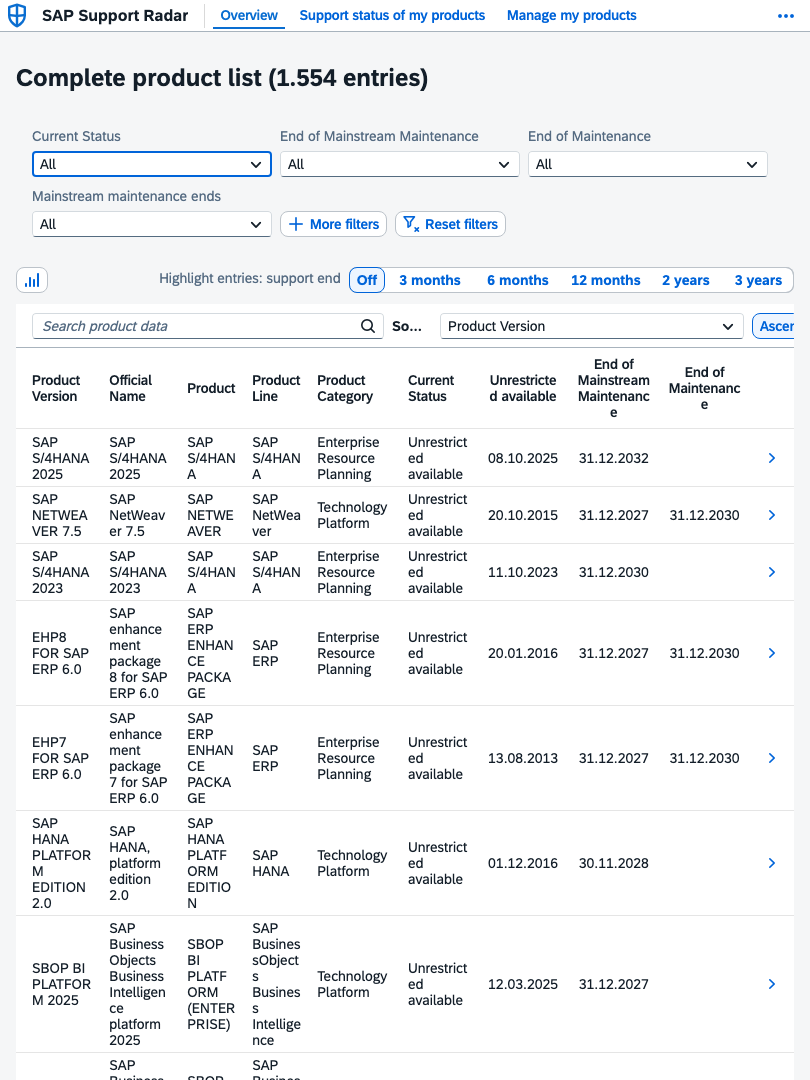
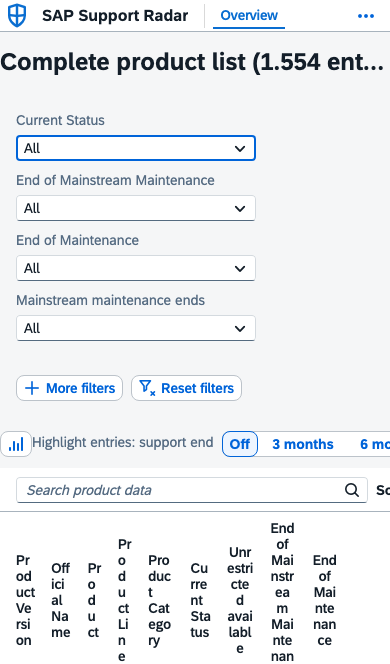
The app adapts to tablet and phone viewports (SAP Fiori responsive table behavior — columns collapse into a pop-in layout on narrow screens):
Uploading / downloading data
All four JSON interactions funnel through two small shared helpers:
webapp/util/JsonFileUpload.ts#pickJsonFileopens the browser's native file picker (restricted to.json) and reads the selected file as text.webapp/model/jsonArrayParser.ts#parseJsonArrayOfObjectsvalidates the uploaded content is a JSON array of plain objects, returning a discriminated-union result (parseError/notArray/invalidEntries/ok) so each caller can show a tailored, localized error message.
| Action | Where | Target model |
|---|---|---|
| Upload PAM.json | App toolbar | pam |
| Upload my products | App toolbar | ownProducts |
| Add (checkbox selection) | MyProducts | ownProducts (merge) |
| Download | MyProducts | downloads OwnProducts.json |